Start with a small scene
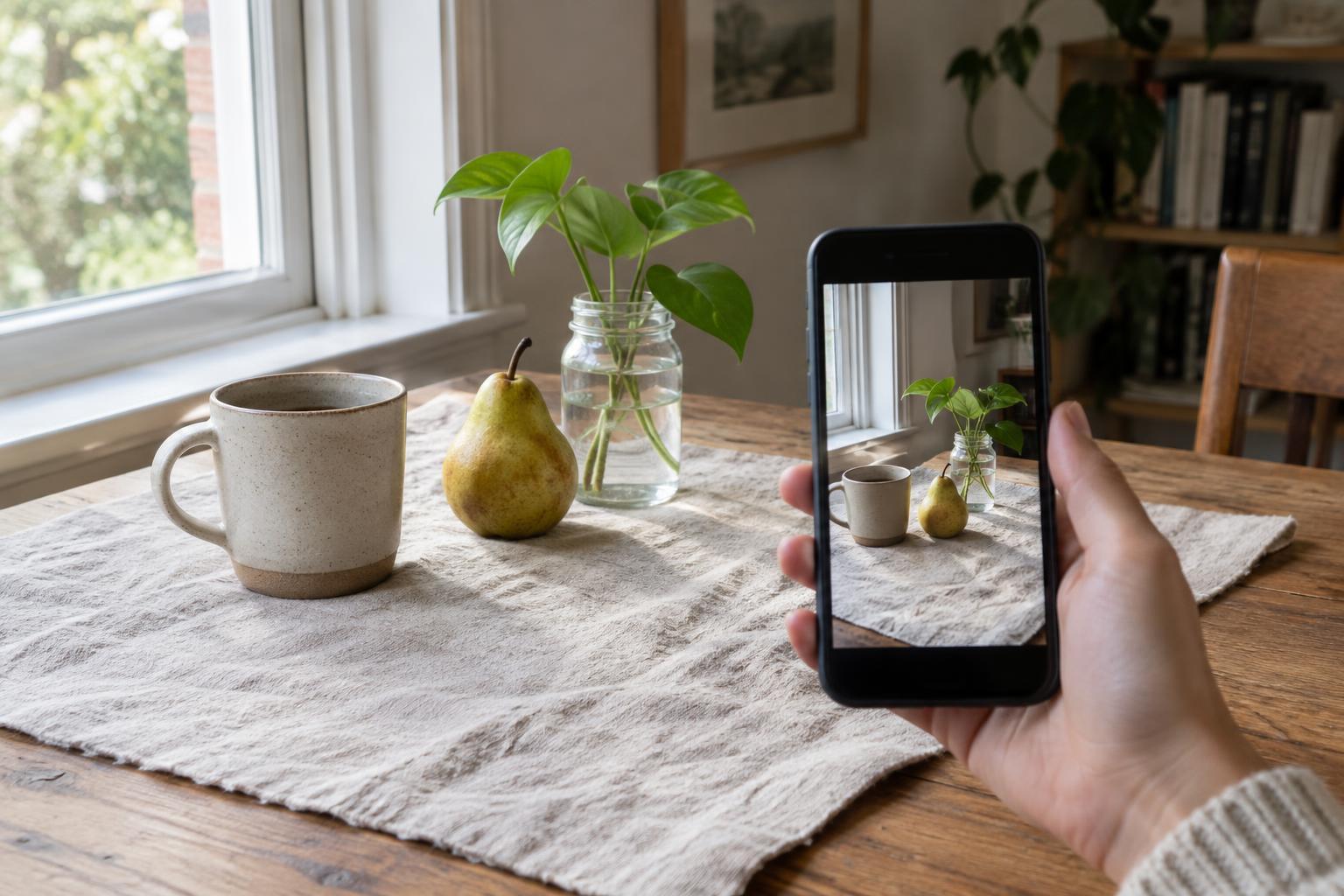
Still-life photography is a way to pay attention to ordinary things. A mug, a piece of fruit, a folded napkin or a set of keys can become the subject. You do not need a studio: a table near a window gives you a place to arrange objects, while your smartphone lets you try ideas without using up materials.
Begin with two or three items that share a color, purpose or story. A cup beside a book suggests a quiet break; lemons next to a dish towel suggest a kitchen scene. Choose one item as the main subject and let the others support it. If everything is equally bright, large or detailed, the viewer may not know where to look. Remove an object before adding another whenever the arrangement feels crowded.
Keep the background simple at first. A plain wall, sheet of paper, wooden board or unpatterned cloth can help separate your subject from its surroundings. Check the entire phone screen before taking a photo, especially the corners. A stray cord or the edge of a chair can pull attention away from the scene.
Use the window to shape the light
Place your arrangement beside a window and turn off nearby lamps if their warm color makes the scene look uneven. Side light, with the window to the left or right of your subject, often makes shapes and textures easier to see. Move the table or objects closer to the glass for a brighter scene, then move them farther away to see how the shadows change.
Direct sun can create sharp shadows that suit bold shapes. If you want gentler shadows, try photographing when the window is not in direct sun, or diffuse the light with a sheer curtain. Avoid putting anything against a hot lamp or blocking a window that needs to remain accessible. The goal is not to find one perfect lighting setup but to notice what different light does to the same objects.
For a little more detail on the shadow side, place a white sheet of paper or a light-colored board opposite the window. It can reflect some light back onto the subject. For deeper shadows, remove the board or try a darker surface. Take a picture after each change so you can compare the results rather than relying on memory.
Compose by moving yourself and the objects
Before reaching for camera settings, try three viewpoints. Shoot from directly above for a flat arrangement on a table, from the subject’s height for a more personal view, and from an angle between the two. Notice how each position changes which objects overlap and how much of the background appears. Move slowly around the scene while watching the edges of the screen.
Leave some open space around your main subject so its shape is easy to read. You can center it for a calm, orderly image or place it off-center to give the scene a sense of movement. Neither approach is automatically better. If an object seems awkwardly cut off at the edge, either bring it fully into the frame or move closer so the crop feels deliberate.
Try taking a wider photo before moving in for details. A wide view can show the relationship between objects, while a close view can draw attention to a peel, a paper edge or the curve of a handle. If your phone switches lenses automatically at close range, check the preview to make sure the look is what you intended.
Make the phone do the simple things well
Wipe the camera lens with a clean, soft cloth before you begin. Then tap your main subject on the screen to set focus. Many phone cameras let you adjust brightness by sliding a control after tapping; if yours does, make small changes and watch whether pale objects lose detail or dark objects become hard to see. The preview is more useful than a rule about how bright a photo should be.
Hold the phone steady with both hands or rest it against a solid object. If pressing the shutter shakes the phone, a short timer may help. Take several frames after each adjustment rather than rushing to rearrange everything. A small change in angle can prevent one object from hiding another or keep a distracting reflection out of a glass surface.
You can experiment with portrait mode if your phone offers it, but check the edges of objects for unnatural blur. An ordinary camera mode is often easier to control for a tabletop scene. Digital zoom may reduce detail on some phones, so moving closer is worth trying when you have room.
Edit lightly, then try a repeat session
Choose a favorite image before editing. Straighten it if the table or wall looks unintentionally tilted, and crop only enough to remove distractions or strengthen the arrangement. Adjust brightness, shadows or color in small steps. If a white napkin starts looking gray or a piece of fruit changes color dramatically, compare the edit with the original and pull back.
For an easy practice session, photograph the same three objects in three arrangements: grouped closely, spaced apart and with one item partly overlapping another. Keep the window and background the same. Comparing those photos can show you what composition changes accomplish without adding new equipment or complicated settings.
Save the versions you like, including one that you leave unedited. Over time, you may notice a preference for soft light, strong shadows, neat arrangements or lived-in scenes. That preference is a useful guide for your next photograph, even if your subjects are simply whatever happens to be on the table.